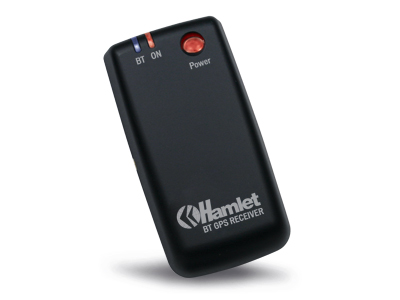
This GPS:
Everything started one week ago when I had a new project in mind.
In this project (I will talk about it in a future post) I have to make my android phone talk with my macbook through bluetooth.
What I need to do:
- expose an RfComm Service on Android device
- search the device from the mac (inquiry)
- establish a connection between the phone and my mac through bluetooth
- pass data between phone and mac
Use a gps bluetooth is enough for a simulation of these operations.
The problems
Documentation.
Yes, this is the first problem.
The second one is .. I've never developed something for OsX but I have did something with IOS (it helps).
Since the arrive of Bluetooth 4.0 LE, Apple make some changes to the bluetooth library.
For what I've seen from the Apple documentation, they did a lot of improvements to make the new library easy to use.
Only new apple product support BT4.0LE... if you have to talk with previous BT device.. you need to use old library.
My Mac and my btgps are old.. so no BT4.
I didn't find any documentation on how to use the old library.. so you have to surf the web searching for the answers.
The code
The code is here(the important stuff, you need to customize it) is on gist.github.com and this is how it works:
- after application is started it search bt devices and get the names of all the visible bluetooth device (this is called inquiry). In this step I search for the BT Device with the name "HBTGPS" and I save the reference locally.
- the second step is searching for the available services on the device. (it is called SDP: service discovery protocol). Every Bluetooth device can have one ore more services to expose.
- the third step is: check if RfComm service is present on the device and get the channel on which RfComm is available. A service is bound to a channel.
- Last step, with the channel and the reference of the bluetooth device I can open the connection and start getting data from the device. Here there are some protocol methoeds call after every change.
This is the output of the program:
2012-07-19 01:19:05.427 FMOSXAPP[406:903] ok, go on
2012-07-19 01:19:05.452 FMOSXAPP[406:903] Let's start inquiry devices around me
2012-07-19 01:19:05.621 FMOSXAPP[406:903] found this device 00-0a-1a-17-88-d6
2012-07-19 01:19:18.335 FMOSXAPP[406:903] updating names for: 1
2012-07-19 01:19:18.435 FMOSXAPP[406:903] That's my boy! HBTGPS
2012-07-19 01:19:18.437 FMOSXAPP[406:903] I gottcha!
2012-07-19 01:19:18.443 FMOSXAPP[406:903] Service: SPP slave
2012-07-19 01:19:18.444 FMOSXAPP[406:903] ChannelID FOUND 1 1
2012-07-19 01:19:18.444 FMOSXAPP[406:903] Found rfcomm channel on device.. 1
2012-07-19 01:19:20.332 FMOSXAPP[406:903] channel complete
2012-07-19 01:19:20.469 FMOSXAPP[406:903] received: ,000,*71
$GPGSV,2,2,08,04,00,000,,04,00,000,,31,00,000,,07,00,000,*71
$GPRMC,000027.0,V,1438.70599,N,01215.00413,E,,,010100,,,N*70
$GPGGA,000038.0,4128.70599,N,01215.00423,E,0,00,,-00027,M,,,,*1F
$GPGSA,A,1,,,,,,,,,,,,,,,*1E
$GPGSV,2,1,01,09,00,000,,25,00,000,,08,00,000,,27,00,000,*71
$GPGSV,2,2,03,06,00,000,,03,
2012-07-19 01:19:20.476
(I've changed a little bit the data from the gps.. just for privacy :P)