Showing posts with label bluetooth. Show all posts

Wednesday, 29 May 2013

Blackberry10 and Arduino: how to make them friends

This is an image and a video showing the arduino interacting with my dev alpha C (like a blackberry Q10):


You can find the Bluetooth Cascades app here: https://github.com/blackberry/Cascades-Samples/tree/master/bluetoothsppchat

For arduino just follow the previous tutorial: http://pestohacks.blogspot.it/2013/05/arduino-bluetooth-rn-42-recently-ive.html

Tuesday, 21 May 2013

Arduino & Bluetooth RN-42

Recently I've started to deeply experiment with Arduino.
My last experiment involved using bluetooth.
I've bought a bluetooth module: RN-42 , cause it is cheap and there are a lot of tutorial around the web that talk about it.

Connection to the Arduino Uno

The image above rappresent the connection on the front of the chip.
To make it working with Arduino you should connect:
  • RN42 PIN 11 to Arduino 3.3V
  • RN42 PIN 12 to Arduino GND
  • RN42 PIN 13 to Arduino TX
  • RN42 PIN 14 to Arduino RX
  • RN42 PIN 16 to RN42 PIN 15
After that you have to power ON Arduino.

Setup the module
I have used an android application, BlueTerm (free), to setup the module.
The RN-42 have a "command" mode to change the parameter of the module: speed, bluetooth name, and other options.

After power on the module, pair your device (or simply your pc) with the RN-42, the PIN is 1234.
Than use a bluetooth terminal to connect to the module again and type these commands:
$$$
SU,11
S~,3
SN,whatevernameyouwant
---
The $$$ means "enter command mode" instead "---" means "end command mode".
After every command you should see an "ACK" response from the module.

The description of the above commands and all the available commands are reported here : https://www.sparkfun.com/datasheets/Wireless/Bluetooth/rn-bluetooth-um.pdf

Testing the connection
Connect your arduino and launch the ide.
Write the following code:

void setup() {              
   Serial.begin(115200);

}
void loop() {
  Serial.println("hello bt");

 delay(1000);  
}

and then load it with usb connection to arduino.
Now use a bluetooth terminal to connect to the module and read the data.

Check this video if you are searching a good tutorial.

Thursday, 2 August 2012

A Bluetooth Server on Android: part 2, the code

From the previous post
Summary for a bluetooth server:
- Turn the bluetooth chip on
- Be visible to others
- Create a Service
- Listen for incoming connection

The methoed for realize the previous steps are in these methoeds extracted by the code of TetheringIndicator.

Wednesday, 1 August 2012

A Bluetooth Server on Android: part 1

This is the first of 2 posts on "How to make your Android Phone, listen for remote request with bluetooth".
Bluetooth is a mature tecnology used everywhere.
For my experience, it is not an easy tecnology to manage, if you want to simply share something you have to follow many steps.
If you are a developer and you want to simply create a connection and pass data between 2 devices (whatever the devices are), you have to create a lot of code and first of all, learn how this tecnology works.
As a reference platform in this post I will use Android; things can change from a platform to another but the key concept are the same.

Who are you? Be visible!


Bluetooth have differents modes:
  • visible: any other device around that start a bluetooth search, Inquiry, will find the device.
  • not visible: you can see other device around you, but none can see you in a search and establish a connection.
  • off: the chip is off.

So the first things you have to do, in a bluetooth server are:
  1. get a reference to your internal bluetooth chip
  2. set the chip on
  3. set chip in visible mode
The 2nd and 3rd step require the permission of the user.
On Android, whenever you try to make your bluetooth phone on or visible, a system dialog message, automatically advise the user of the action.

The 3rd step is available only for a limited amout of time (you can specify how many seconds)... I think this is just for security and autonomy reason.

What do you offer? A service
Be visible is not enough to establish a connection with another device.
You have to specify the services that you are offering.


A service is a way to declare what you are capable to offer in term of data, for another device.
It is what you expose to others.
Every phone have some default service created for sharing content like calendar, phonebook etc...
A service is identified by a name and a UUID: http://en.wikipedia.org/wiki/Universally_unique_identifier.

How do we talk? With a profile
A profile is a low level bluetooth protocol that explain which type of message and communication you are trying to establish.
Bluetooth is used in different way so you have different profile specific for a task: there is A2DP for bluetooth audio communication (used by bluetooth earphone), Obex for file transfers, L2Cap for exchange information, RfComm is a sort of serial communication over bluetooth and others profiles.
When you have to make 2 device talk eachother with your own protocol, the options are usually use L2Cap or RfComm and built your protocol on top of them.
I have decided to use RfComm.

Summary for a bluetooth server:
- Turn the bluetooth chip on
- Be visible to others
- Create a Service
- Listen for incoming connection

Next:
The android code will be explained and available in the next post on the blog.

Thursday, 19 July 2012

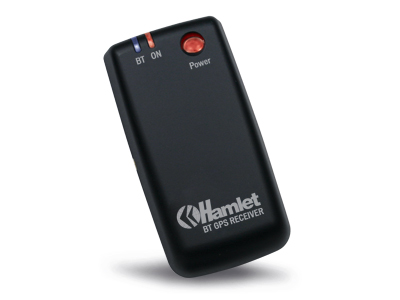
Make Osx talks with a Bluetooth GPS

This GPS:
Everything started one week ago when I had a new project in mind.
In this project (I will talk about it in a future post) I have to make my android phone talk with my macbook through bluetooth.
What I need to do:

- expose an RfComm Service on Android device
- search the device from the mac (inquiry)
- establish a connection between the phone and my mac through bluetooth
- pass data between phone and mac

Use a gps bluetooth is enough for a simulation of these operations.


The problems
Documentation.
Yes, this is the first problem.
The second one is .. I've never developed something for OsX but I have did something with IOS (it helps).
Since the arrive of Bluetooth 4.0 LE, Apple make some changes to the bluetooth library.
For what I've seen from the Apple documentation, they did a lot of improvements to make the new library easy to use.
Only new apple product support BT4.0LE... if you have to talk with previous BT device.. you need to use old library.
My Mac and my btgps are old.. so no BT4.
I didn't find any documentation on how to use the old library.. so you have to surf the web searching for the answers.
 

The code
The code is here(the important stuff, you need to customize it) is on gist.github.com and this is how it works:
  • after application is started it search bt devices and get the names of all the visible bluetooth device (this is called inquiry). In this step I search for the BT Device with the name "HBTGPS" and I save the reference locally. 
  • the second step is searching for the available services on the device.  (it is called SDP: service discovery protocol). Every Bluetooth device can have one ore more services to expose.
  • the third step is: check if RfComm service is present on the device and get the channel on which RfComm is available. A service is bound to a channel.
  • Last step, with the channel and the reference of the bluetooth device I can open the connection and start getting data from the device. Here there are some protocol methoeds call after every change.
This is the output of the program:
2012-07-19 01:19:05.427 FMOSXAPP[406:903] ok, go on
2012-07-19 01:19:05.452 FMOSXAPP[406:903] Let's start inquiry devices around me
2012-07-19 01:19:05.621 FMOSXAPP[406:903] found this device 00-0a-1a-17-88-d6
2012-07-19 01:19:18.335 FMOSXAPP[406:903] updating names for: 1
2012-07-19 01:19:18.435 FMOSXAPP[406:903] That's my boy! HBTGPS
2012-07-19 01:19:18.437 FMOSXAPP[406:903] I gottcha!
2012-07-19 01:19:18.443 FMOSXAPP[406:903] Service: SPP slave
2012-07-19 01:19:18.444 FMOSXAPP[406:903] ChannelID FOUND 1 1
2012-07-19 01:19:18.444 FMOSXAPP[406:903] Found rfcomm channel on device.. 1
2012-07-19 01:19:20.332 FMOSXAPP[406:903] channel complete
2012-07-19 01:19:20.469 FMOSXAPP[406:903] received: ,000,*71
$GPGSV,2,2,08,04,00,000,,04,00,000,,31,00,000,,07,00,000,*71
$GPRMC,000027.0,V,1438.70599,N,01215.00413,E,,,010100,,,N*70
$GPGGA,000038.0,4128.70599,N,01215.00423,E,0,00,,-00027,M,,,,*1F
$GPGSA,A,1,,,,,,,,,,,,,,,*1E
$GPGSV,2,1,01,09,00,000,,25,00,000,,08,00,000,,27,00,000,*71
$GPGSV,2,2,03,06,00,000,,03,
2012-07-19 01:19:20.476


(I've changed a little bit the data from the gps.. just for privacy :P)