Monday, 22 December 2014

Why every developer should attend an hackathon?

In the past 3 years I have joined at least 10 hackathons, most of them in my country(Italy).
This is me, explaining my idea in the last hackathon I took part: Techcrunch Disrupt Hackathon (London): http://on.aol.com/video/extendernote-at-techcrunch-disrupt--london-2014-hackathon-518470061

Hackathons are a great way for companies to find new ideas around their product and test it in different situations and contexts.
These events are a mashup of tecnologies and products, mixed together in a very short time: a situation not easy to reproduce differently and for a lot of companies not economically possible.

When the product is an API or a libraries, an hackathon is pure gold; they are a good investment with tiny effort, that helps companies to make blackbox testing and be able to validate: documentation, libraries, api and discovers problems of their product.
During an hackathons for 24-48 hours, hundreds of developers are testing company's product/api/libraries for "free".

It is not always a win for a company, some projects/products are just ignored by developers during an hackathons but at least a good way to promote a product.

Btw, there are a tons of good reasons also for developers to be part of an hackathon:
- Test your skills: during an hackathon you will need to put your best knowledge, trying to build a working prototype in a very short time. Every problems will keep you far from your objectives, forcing you to reduce the features you want. It's challenging.
- Networking:find people to create a collaboration (designers for example), talking with people of other places and discovering their way of thinking, that is  culturally different and then, it is interesting.
- Prices: good prototype, good pitch, good idea and a bit of luck, with those ingredients it is possible to win cool prices.
- Validate your ideas: do you think to have a good idea to show? don't you want to measure how good is it? It's the perfect situation: you validate ideas against strangers, not only friends.
- Learn new tecnologies from others of your team or improve your knowledge: I've tested ionicframework during an H this year, just to see how usable is, in a real situation (= not ready enough)
- Feeling home talk with other developers about geek's things: new products, libraries, technologies and ideas.
- Find a new job Never gone to an H for this, but it happens that some companies are there to seek new employes. They'll come to you asking for an interview: "what are you doing in your life? What's your job? Why don't you come and visit our companies?" and so on.
- Pitching speaking in front of a lot of people and explaining your idea. You need to summarize, make choices, be clear and convince others of your work in a short time. Plus: do it in a foreign language.
- Enjoy the experience: it is a devastating phisically experience but you will be happy at the end anyway

And remember to be prepared before the hackathon:
- read how many documentation you can, about the aim of the hackathon and the sponsors (also searching on stackoverflow problems with api/libraries)
- write down some ideas you will like to build there and be prepared to join others idea
- choose a platform/tecnologies that you will use during the H
- prepare your hardware: tablet,smartphones, smartwatch ...
- prepare your software: libraries, framework, examples, documentation

So if you are now convinced and you want to keep an eye on hackathons near you, check www.challengepost.com


Monday, 11 August 2014

Smart Charger: automatically backup your photos

[This is the second post about Arietta: the first is here]

The project
The idea behind this little project is to have a system that charge my phone and automatically backup the photo of my android phone while it is connected.

First of all, you need to attach an usb female adapter to Arietta and connect an usb (powered) hub to it: Follow this page

In order to get the photos on the android phone from Arietta you need to use MTP protocol and there are 2 ways:
a - install mtp-tools packages from repository
b - activate mtp filesystem

For my project the first solution is easier:  launch apt-get install mtp-tools

The solution b was better, because it allows you to mount the phone filesystem and copy files from it with normal linux commands like cp,rsync,mv.. but it's harder because you need to rebuild the arietta image.

External Usb Storage
The Arietta will copy my photos on an external storage instead of the internal sdcard of arietta because this helps to improve the life of the sdcard.

To automatically mount an external storage in a predefined directory:
- use blkid command to obtain an id that identify you external usb storage for the system
- change /etc/fstab and insert a line to specify where the storage mount point

My external usb storage is a simple pendrive formatted with fat32 with UUID FC4D-37AA.
At the end of /etc/fstab I've added this line to mount it on /mnt everytime is plugged in:

UUID=FC4D-37AA /mnt vfat defaults,umask=007,gid=46 0 0


The Backup Script ...
I've created a script called photobackup.sh that use some commands from mtp-tools package to copy and delete jpg photos from the phone:

#!/bin/bash

#check if external storage is present or abort
checkmount=`mount | grep /mnt | wc -l`
echo $checkmount;
if [ $checkmount -ne "1" ]; then
        echo "Usb External Storage not mounted...exiting";
        exit;
fi

echo "Usb External Storage Found";
mtp-files | grep .jpg | awk '{ print $2 }' > lista.txt
while read F ; do
    #there is enough space on device
    spacecheck=`df -h | grep /mnt | awk {'print $5'} | tr -d '%'`
    if [ $spacecheck -gt "95" ]; then
        echo "Not enough space left on device..exiting";
        exit;
    fi
    mtp-connect --getfile $F /mnt/$F # copy the file
    mtp-connect --delete $F          # delete the file from the phone
done

Explanation:

- it checks if Usb External Storage is mounted or it aborts the operation
- it creates a list of jpg files (supposing these are all photos) lista.txt


... and for every photo:
- it checks if there is enough space left on the Usb External Storage
- it reads the list of photos from lista.txt and it uses mtp-connect to copy file to the /mnt/ directory and it deletes the photo from the phone


..and the UDEV Rule!
In order to call photobackup.sh everytime you plug the phone to the hub you need a udev rule.

Create a script 98-my.rules with this content:
SUBSYSTEM=="usb", ATTR{idVendor}=="22b8", MODE="0666", RUN+="/root/photobackup.sh"

and copy it on /etc/udev/rules.d

Now everytime you attach the android phone to the hub, while the phone is charging, arietta copy your photos in the external pendrive, if present.

In the next article we will see how to add a led to monitor the status of the operation.

Friday, 8 August 2014

How to hack Clash Of Clans: Unlimited Shield [UPDATE]

Introduction
*updates on the bottom
I've played for over a year with Clash of Clans: a very nice mobile games.
Day by day, the game become more and more difficult to play without spending money.
It's the classical in-app purchase free game mechanism: pay to survive.


The hack
During the game you have a limited shield, that can save your village from attacks for others player for a max of 16 hours.
Of course you can extends the shield with money.
When you have no shield, the others people can't attack you if you are online and connected.
My first attempt was to put the display of the phone in a "never sleep" mode and leave the app open but this was not a working solution, clash of clans see that you aren't do nothing and it disconnects.

Later I was thinking about an hardware solution with arduino, that could simulate at least the swipes on the touch screen, something like this hack for another game: https://www.youtube.com/watch?v=SnUH6f_Mv8o but there was an easier solution.

UiTesting with UiAutomator
One of the android's tools is called uiautomator http://developer.android.com/tools/testing/testing_ui.html it is used to test UI on apps, so it is possible to write test/programs that simulate click, swipe and other actions on apps running on the phone.
What I have done, it has been write a simple uiautomator test that:

1 - it presses home
2 - it searches clash of clans in the list of apps
3 - it launches clash of clans
4 - it waits 15 seconds for the app to start
5 - it does swipes movement
6 - it waits some seconds
7 - it repeats from 5

I tested the app on my phone (no root required) and my village was opened for over 10 hours(see update #) without any disconnection and of course, none attack! :)


Update #1: 18 Aug 2014
Yesterday I posted on reddit this post, to understand the reaction of some players and what they are thinking about it.
On reddit I've discovered that after 6 hours of game, Clash Of Clans automatically disconnect the client for 5-10 minutes... but, my hack (I'm lucky) keep on try to reconnect during this period and at the end of this period it is correctly reconnected.

I have also discovered there are some hacks out there that works with rooted phone and works in similar way.

Friday, 25 July 2014

Experimenting with Arietta: little & cheap embedded linux board

I bought this board months ago when there was a preorder offer on www.acmesystems.it: just 10 euro!
It's a 400 Mhz board, 256 mb ram, with usb support that runs a reduced sized version of Debian Wheezy: Specs Here.


Setup
First of all you need to:
- prepare a micro sd-card: follow this or buy one ready
- plug arietta with a microusb cable to your windows/linux computer (no mac support ..but of course you can use a virtual machine )
- configure Network on your computer: follow this

When arietta is connected to your PC, it is recognized as a RNDIS/Ethernet Gadget.
On my Linux Xubuntu PC launching ifconfig from a terminal I have a new network interface device "usb0".
After the setup you can use "ssh": ssh root@192.168.10.10  with username root and password acmesystems and you have a shell on arietta!

Install Packages
Install new packages on arietta is simply apt-get!

To let Arietta reach internet you can:
1 - connect an usb to ethernet adapter to Arietta, and configure it
2 - use your PC as a gateway to forward the traffic of Arietta through the USB connection

For step 2 this is what I did on a xubuntu machine:
- change sysctl.conf and uncomment from the line to forward packages "net.ipv4.ip_forward=1"
- launch the following commands: the eth1 is the NIC connected to internet

echo 1 > /proc/sys/net/ipv4/ip_forward
iptables -t nat -A POSTROUTING -o eth1 -j MASQUERADE
iptables -A FORWARD -i eth1 -o usb0 -m state --state RELATED,ESTABLISHED -j ACCEPT
iptables -A FORWARD -i usb0 -o eth1 -j ACCEPT

(Of course everytime you reboot the machine the iptables rules are lost.. unless you change iptables setup)

Now you can connect again to arietta with ssh:
- update repository /etc/apt/sources.list
- apt-get update
- apt-cache search
- apt-get install

Topic of the next article: arietta, libmtp, udev, photo backup... and "juice jacking"


Wednesday, 5 March 2014

Showing my heart rate while playing a scary game: Slender Game


 Yesterday, I've done this video:

Watch fullscreen

It shows me and my heart rate while playing Slender (www.slendergame.com).
With arduino, pulsesensor.com and some scripting I was able to monitor my heart rate.

Normally when I'm calm, my heart rate is around 50 BPM.
If you want to watch the most funny part of the video, go to minute 14 and watch how the BPM changes.

It's not hard to reproduce something like that.

Tuesday, 3 December 2013

I believe in a thing called Drone

Yesterday, Amazon did a big announcement: soon (in the next years) drones will be used to delivery package to your door.
Amazon is not the first one with this idea, but just the fact they have said that (for advertisement o not), it is an incredibly recognition that we are near to the drone's revolution.
I'm a huge fan of drones for civil use... because I'm geek.. you know, geek loves these things.

After this news, a lot of skeptics came out with only one sentence in mind a "I know how drones work dude, this is not possible"

Problems exists, obviously
Every new thing bring with it problems.. problems are everywhere, in every aspect of every project.
And when you have a problem you have to find the right solutions, the best fit solution to the problem.

There are 3 category of drones's problems:
  • Technical Limitations: The drone's expert say for example, that drones don't have enough autonomy to carry something and come back: for all of them I just want to answer, you need research and moneys (like amazon or google?yes) and you can create something that is not available today but tomorrow and of course better. The tecnology change everyday. so I don't bother about these aspect. Your experience is not the only one solution.  I think the answer to question like "what if a drone broke and fall down?/what if a drone crash with a bird/What if a drone crash with another one" will come out.
  • Privacy Concerns and Legal Aspects: these are the real problems. A lot of problems, for example, the FAA is worried about both violence to and from drones...because there are crazy persons who wants to shot to drones... but apart from that, again, I think laws will come out as for every new thing. At the beginning we will have place where drone delivery will be available and other where not. 
Revolutions need time and of course other problems when the first drone will deliver a package will come out.. but for me it just a matter of when not how.
If you are not able to do today something it doesn't mean someone, with a team of expert can do it somewhere in another place soon :)

Finally, you need to dream, dream it is necessary, because if you just stop to this phrase "this is not possible", nothing it will ever change, and this is not just for drones, but for anything.
Call me a believer!
I believe in drone.

Tuesday, 5 November 2013

Plot a graph with Arduino Yun

This is a short article, some "tips&tricks" if you need to plot a chart with data generated from the Arduino Yun.
I report it here, just to report my work.

This article starts from this: http://arduino.cc/en/Tutorial/TemperatureWebPanel that explain how to use the Bridge to capture data from a temperature Sensor and make the data accessible from a web page inside an sdcard on the Yun.

Plot a chart
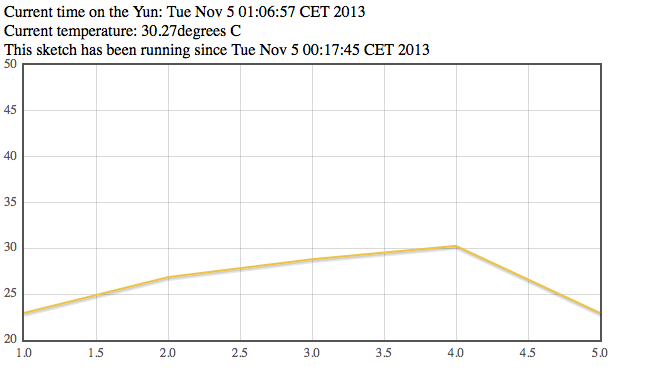
My scripts, it helps to plot the last 5 temperatures.
You have to change a little bit the script on the page and replace some files.

1 - I've added this at the beginning of the arduino script:
float lastTemp[5];
to save the last 5 temperatures
2 - Replaced  this part
      client.print("Current time on the Yun: ");
      client.println(timeString);
      client.print("
Current temperature: ");
      client.print(temperature);
      client.print(" degrees C");
      client.print("
This sketch has been running since ");
      client.print(startString);
      client.print("
Hits so far: ");
      client.print(hits);
with this one:
      lastTemp[hits%5] = temperature;
      for(int i=0;i<5;i++){       
client.print(lastTemp);

        client.print(";");
      }
      client.println(timeString+";"+startString+";"+hits+";");


So the page from arduino now it retuns all the data plus the last 5 temperature read, separated by ";"

3 - I've replaced the files in /arduino/www/TemperatureWebPanel with the ones HERE: it uses jquery and jflot

This is the final plot:


This is not the rightway
My script plot the last 5 request read from the sensor, but the right way is to leave the arduino part to ciclic fetch the temperature and save it on a file on the sdcard.
The html/js page need to read the same file and plot the temperatures with the data from the file.
I will update it later with a new solution.