Friday, 25 July 2014

Experimenting with Arietta: little & cheap embedded linux board

I bought this board months ago when there was a preorder offer on www.acmesystems.it: just 10 euro!
It's a 400 Mhz board, 256 mb ram, with usb support that runs a reduced sized version of Debian Wheezy: Specs Here.


Setup
First of all you need to:
- prepare a micro sd-card: follow this or buy one ready
- plug arietta with a microusb cable to your windows/linux computer (no mac support ..but of course you can use a virtual machine )
- configure Network on your computer: follow this

When arietta is connected to your PC, it is recognized as a RNDIS/Ethernet Gadget.
On my Linux Xubuntu PC launching ifconfig from a terminal I have a new network interface device "usb0".
After the setup you can use "ssh": ssh root@192.168.10.10  with username root and password acmesystems and you have a shell on arietta!

Install Packages
Install new packages on arietta is simply apt-get!

To let Arietta reach internet you can:
1 - connect an usb to ethernet adapter to Arietta, and configure it
2 - use your PC as a gateway to forward the traffic of Arietta through the USB connection

For step 2 this is what I did on a xubuntu machine:
- change sysctl.conf and uncomment from the line to forward packages "net.ipv4.ip_forward=1"
- launch the following commands: the eth1 is the NIC connected to internet

echo 1 > /proc/sys/net/ipv4/ip_forward
iptables -t nat -A POSTROUTING -o eth1 -j MASQUERADE
iptables -A FORWARD -i eth1 -o usb0 -m state --state RELATED,ESTABLISHED -j ACCEPT
iptables -A FORWARD -i usb0 -o eth1 -j ACCEPT

(Of course everytime you reboot the machine the iptables rules are lost.. unless you change iptables setup)

Now you can connect again to arietta with ssh:
- update repository /etc/apt/sources.list
- apt-get update
- apt-cache search
- apt-get install

Topic of the next article: arietta, libmtp, udev, photo backup... and "juice jacking"


Wednesday, 5 March 2014

Showing my heart rate while playing a scary game: Slender Game


 Yesterday, I've done this video:

Watch fullscreen

It shows me and my heart rate while playing Slender (www.slendergame.com).
With arduino, pulsesensor.com and some scripting I was able to monitor my heart rate.

Normally when I'm calm, my heart rate is around 50 BPM.
If you want to watch the most funny part of the video, go to minute 14 and watch how the BPM changes.

It's not hard to reproduce something like that.

Tuesday, 3 December 2013

I believe in a thing called Drone

Yesterday, Amazon did a big announcement: soon (in the next years) drones will be used to delivery package to your door.
Amazon is not the first one with this idea, but just the fact they have said that (for advertisement o not), it is an incredibly recognition that we are near to the drone's revolution.
I'm a huge fan of drones for civil use... because I'm geek.. you know, geek loves these things.

After this news, a lot of skeptics came out with only one sentence in mind a "I know how drones work dude, this is not possible"

Problems exists, obviously
Every new thing bring with it problems.. problems are everywhere, in every aspect of every project.
And when you have a problem you have to find the right solutions, the best fit solution to the problem.

There are 3 category of drones's problems:
  • Technical Limitations: The drone's expert say for example, that drones don't have enough autonomy to carry something and come back: for all of them I just want to answer, you need research and moneys (like amazon or google?yes) and you can create something that is not available today but tomorrow and of course better. The tecnology change everyday. so I don't bother about these aspect. Your experience is not the only one solution.  I think the answer to question like "what if a drone broke and fall down?/what if a drone crash with a bird/What if a drone crash with another one" will come out.
  • Privacy Concerns and Legal Aspects: these are the real problems. A lot of problems, for example, the FAA is worried about both violence to and from drones...because there are crazy persons who wants to shot to drones... but apart from that, again, I think laws will come out as for every new thing. At the beginning we will have place where drone delivery will be available and other where not. 
Revolutions need time and of course other problems when the first drone will deliver a package will come out.. but for me it just a matter of when not how.
If you are not able to do today something it doesn't mean someone, with a team of expert can do it somewhere in another place soon :)

Finally, you need to dream, dream it is necessary, because if you just stop to this phrase "this is not possible", nothing it will ever change, and this is not just for drones, but for anything.
Call me a believer!
I believe in drone.

Tuesday, 5 November 2013

Plot a graph with Arduino Yun

This is a short article, some "tips&tricks" if you need to plot a chart with data generated from the Arduino Yun.
I report it here, just to report my work.

This article starts from this: http://arduino.cc/en/Tutorial/TemperatureWebPanel that explain how to use the Bridge to capture data from a temperature Sensor and make the data accessible from a web page inside an sdcard on the Yun.

Plot a chart
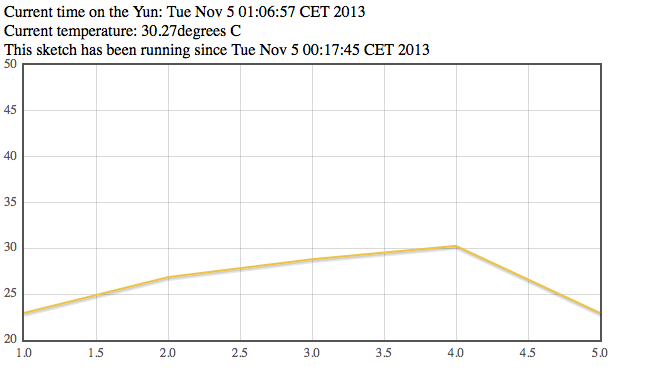
My scripts, it helps to plot the last 5 temperatures.
You have to change a little bit the script on the page and replace some files.

1 - I've added this at the beginning of the arduino script:
float lastTemp[5];
to save the last 5 temperatures
2 - Replaced  this part
      client.print("Current time on the Yun: ");
      client.println(timeString);
      client.print("
Current temperature: ");
      client.print(temperature);
      client.print(" degrees C");
      client.print("
This sketch has been running since ");
      client.print(startString);
      client.print("
Hits so far: ");
      client.print(hits);
with this one:
      lastTemp[hits%5] = temperature;
      for(int i=0;i<5;i++){       
client.print(lastTemp);

        client.print(";");
      }
      client.println(timeString+";"+startString+";"+hits+";");


So the page from arduino now it retuns all the data plus the last 5 temperature read, separated by ";"

3 - I've replaced the files in /arduino/www/TemperatureWebPanel with the ones HERE: it uses jquery and jflot

This is the final plot:


This is not the rightway
My script plot the last 5 request read from the sensor, but the right way is to leave the arduino part to ciclic fetch the temperature and save it on a file on the sdcard.
The html/js page need to read the same file and plot the temperatures with the data from the file.
I will update it later with a new solution.

Monday, 14 October 2013

My First Impressions On The Arduino Yun

These are great years for geek: hardware is cheaper and new gadget come out everyday
It's our time!
Our creativity is screaming inside us, due to the incredible number of things that everyday comes out.
Some days ago I bought an Arduino Board Yun (all the specs here).

I mainly bought it just to support Arduino: because it's an italian project and I was curious to see if the new Yun have the same potential of Arduino Uno.

Anyway reading the specs, these are the things that I like most on this board:

  • The Arduino part of Yun is an Arduino Leonardo's like (mouse and keyboard feature!)
  • ethernet,wifi,sdcard support: no more expensive shell to add (Note: if you can reach internet you can use NTP, so you don't need an RTC)
  • a real processor with Linux: and all the possibilities offered by linux software. The distro is Linino, based on the famous OpenWrt!
  • linux + usb: means attach webcam, pendrive, other usb devices.
  • POE support(from the doc: "The Yún is also compatible with PoE power supply but in order to use this feature you need to mount a PoE module on the board or buy a preassembled one."
  • Wifi capabilities means: no bother with bluetooth, zigbee, android adk... you can write app on mobile that talk with Yun just with http/html/js (for example).
  • Wifi support accesspoint mode: this means you can connect things with wifi using Yun as the hotspot
  • Can be remote programmed: do you need to upgrade the software on the arduino connected in another room? Now you can thanks to wireless
  • Same dimension of the current Arduino Uno.
  
Arduino Uno (left) & Yun (right)

  • Temboo: do you need to use dropbox, flickr, twitter, facebook, google calendar, google docs or other online services with your Yun? Temboo is a framework that let you work with those services easily, standardizing the way you access these API... and it works with your Yun of course!

I don't think Yun is here to beat raspberry pi (maybe only in few project) but to replace existing project with Arduino uno/leonardo with a new powerful version able to: easy connect to internet, communicate with "things", remove expensive shields, improve experience and help you to fast prototype IOT objects.
For now, it seems that the standard Linino image shipped with yun is limited..but it's Opensource Baby... and so..the next step is this: github/repo.
See you soon with new info about Yun!

Thursday, 8 August 2013

Windows Phone: the dumbphone

Personally I don't like microsoft product, the only project they've built and I've really apprecciated are Xbox and kinect.
Everytime I think about of a Microsoft product my idea is on something with bug, low quality and problems.
A product that can makes your life harder instead of improve it.
Anyone have hated Bill Gates/Ballmer at least one time in their life.

When 3 years ago, MSFT launched Windows Phone, my feeling was the same, but... you have to try before judge.
My sister bought a nokia 800 windows phone after she lost her android phone, it was cheap and she liked the design; after 5 months, she hate it because every action is complicated and she can't do a lot of things compared to her lost android.
She choose a Nokia because in the past she have one and she was satisfied by the product... but she doesn't know anything about WP.
When Microsoft come out with the new interface, a lot of people thought it was a great thing, it was something new, that break with the past, and also it breaks with windows mobile that was a totally disaster.
I've played a bit with her phone and I totally agree with her: WP sucks.

General Feeling
When you buy a smartphone you suppose it is SMART but WP interface makes the phone dumb: a dumbphone.
To design an interface like WP, you should think your potential client is dumb or not so clever enough to use something advanced ; and advanced doesn't mean harder to use.

Text, Font, Space everything is LARGE
The screen is always filled with text everywhere.
Icons was created to be more immediate, Microsoft designer forgot it.
They have replaced icons with those "genius" live tiles.. a sort of animated square:
- animation is a cool effect, in the first day: boring the rest and it can only help you lose your focus on your actions.. wasting your time.
- battery hungry: they can burn your battery faster than you think.
- a waste of space: you can have just 8-10 square in a screen, while you can put in the same space 16 icons with better result..but microsoft prefer that you scroll and scroll and scroll to reach the function you are searching for instead of just tap on an icon.

App Flow
The general flow in a WP app is to scroll the app horizontally, like a flyer...
So after the first screen, you often have to swype right/left to access the content of your app.
Due to lack of gerarchy in the app.. after some left/right swype searching for your function inside the app, you feel like lost in the application.. Where am I? Where should I have to go?
And if you want to be fast the following times you want to access the app, you should remember where that f*cking function is.. for every app: "how many left/right swype to reach function xyz?"


Apps in the store
I don't know which are the guidelines, but a lot of application I have tested on this Nokia 800, are horrible... the feeling here is they always lack on something, like they were forgot to add something on the UI.
I think the problem is in the UI concept itself.
Minimalism is a good think when used in a clever way,it can make an interface easier... but it is hard to implement.
If you think minimalism is just "remove" things from an UI to make it easier, you are damn wrong.
I have tested also 2 different application for dropbox: one doesn't work (and it was the first search result) and the other one was slow to just upload photos over WIFI!
..a terrible experience

The future
WP doesn't feel that you have bought a smartphone, it's more like you have in your hand the interface of an automatic ticket machine...

For me Windows Phone have no future.
After some initial enthusiasm, people will recognize how frustrating is the WP experience and they will abandon it... unless something iwill happen.
You can see also in windows tablet sales... expecially for RT...

80% of WP are nokia phone: people are buying nokia WP not for WP itself but just because they are Nokia product.
Nokia was famous for create good products in the past... now, the overhall experience of the product will be destroyed by a stupid OS.
Without Nokia, windows phone would be another microsoft fail.

Friday, 5 July 2013

YourPhoneAsHomeConsole opensource on github

I've found some time, to check a little bit the code of my last hack: Putting a WebServer Inside a Phone (why? http://pestohacks.blogspot.it/2013/03/putting-webserver-inside-phone.html ).

The code is now OpenSource and Downloadable ON GitHub
This version runs on BlackBerry Z10, it is just a proof of concept.

It is based on mongoose and jawsjs.

After launched the app:
  • your phone and your pc should stay in the same LAN
  • you have to open the browser (chrome is better) from the pc and connect to the phone http://SmartphoneIP:8080
  • play space invaders using your phone as a pad :)